Discord has transformed in recent years into something more than just a chat platform for gamers. Today, it is a powerful communication platform uniting millions of users—from streamers and esports players to business teams and educational communities. Flexible server settings, convenient bots, and integration with other services make Discord a versatile tool for online communication.
If you have decided to part ways with Discord, whether due to a desire to reduce time spent on social media, switching to another platform, or simply because you no longer need the service, it is important to delete it properly. There are two options: you can simply uninstall the program, or you can completely wipe your profile to ensure that your data does not remain on the servers. Let’s figure out how to delete Discord.
Why is it not enough just to send Discord to the trash?
Many users think that deleting the application is simply moving it to the trash. However, Discord, like most modern programs, leaves behind settings, cache, and temporary files. If these are not deleted, they can take up space or store personal data.
Deleting Discord from a computer
For proper deletion of the messenger, it is important not only to uninstall the program but also to get rid of all associated files, even temporary ones. Keeping this data in the system will not cause critical failures, but it may lead to problems during subsequent installations of the application on the same computer.
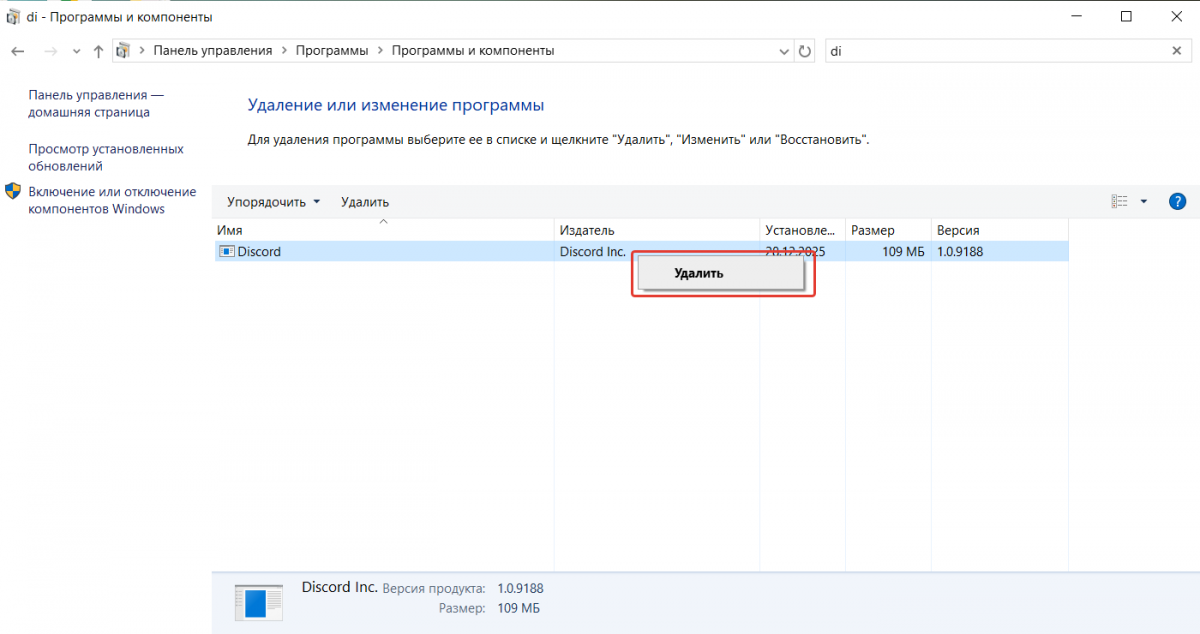
How to delete Discord from a computer? Go to the "Control Panel" → "Programs and Features," find Discord in the list, and select "Uninstall."
Deleting using cleaning programs
Regularly uninstalling the messenger leaves behind junk—temporary files that accumulate over time, taking up space and reducing computer performance.
In this case, how do you completely remove Discord from your computer? To fully clean the system, it is better to use professional tools: CCleaner, Revo Uninstaller, or IObit Uninstaller. These utilities scan the system at a deep level, removing even residual data, thereby optimizing PC performance.
Deleting Discord from a phone
On smartphones, the process is simpler, but there is a nuance here as well. Here’s how to delete Discord from your phone.

-
Android: Long press the icon → Uninstall. Additionally, you can clear the cache in the app settings.
-
iOS: Long press the icon → Delete App. However, data may be stored in iCloud if synchronization is enabled.
Smartphones, like computers, can be cleaned of "digital junk" using specialized utilities. Unlike standard deletion, these tools not only remove the application itself but also its temporary files, cache, and other hidden data.
This not only saves space in memory but also relieves the system, so the device's resources are not wasted. If you need a thorough cleanup, try Easy Uninstaller, Revo Uninstaller Mobile, or Root Uninstaller. They perform the task better than built-in tools.
How to delete an account in Discord
If you want to not just delete the app, but completely get rid of your profile.
How to delete an account in Discord?
-
Open Discord.
-
Click on the gear icon (User Settings).
-
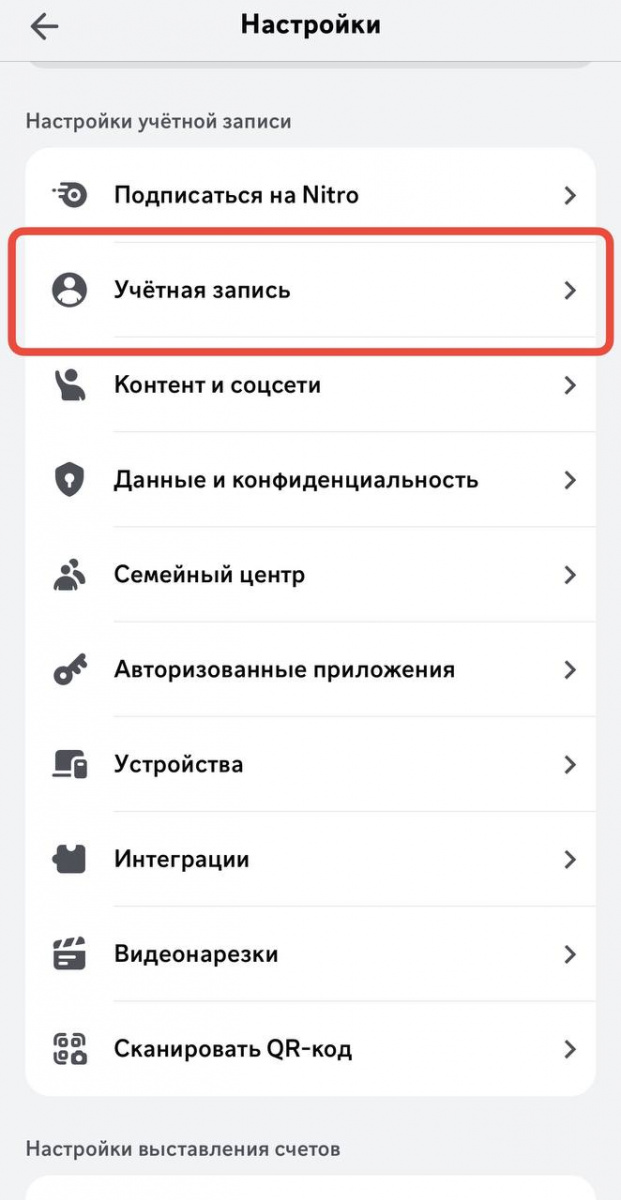
Go to "Account"
-
Click "Disable Account" (temporary deactivation) or "Delete Account."

Automating posts in Discord
If you use this social network for work or promotion, you will find auto-posting in Discord useful. Our service Postmypost allows you to schedule posts in channels and chats days or even weeks in advance.
We have discussed how to delete Discord. As you can see, it is very simple. If you are confident in your decision—take action. But if you have doubts, it might be better to choose temporary deactivation. This way, you will keep your chat history and access to communities, but you can take a break from using Discord.