
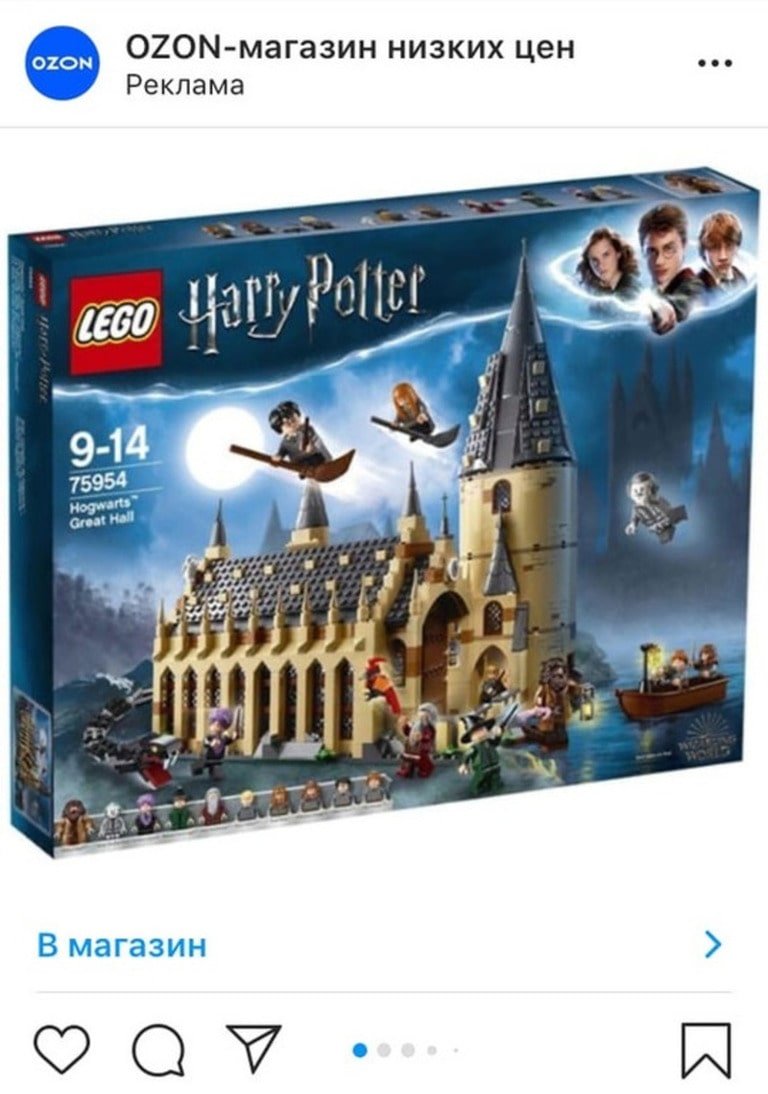

If you've never tried setting up Instagram targeting through Facebook and have been putting it off, now with our guide, you definitely won't be able to escape it!
Targeted Advertising Opportunities on Instagram
Targeting on Instagram is one of the most popular ways to promote products and services on social networks. It's an excellent sales tool that allows you to precisely target people who may become your potential customers and who are interested in your product.
What You Need to Do to Start Your First Instagram Ad Campaign
So, if you want to create an ad on Instagram, we assume that you already have a social media account to direct clients to. If not, you first need to create a page for your products, services, or personal brand where you will attract clients, and it has to be as appealing as possible. How and by what means should you make it appealing?
Pay attention to the account's packaging:
How to Switch to a Business Account on Instagram
If you switch a regular Instagram account to a business account format, you'll receive extended statistics on your profile, completely free of charge. Moreover, you'll have access to the following features:
- specify contact buttons (phone/email);
- choose your business category;
- attach your company's geolocation;
- analyze the effectiveness of promotions.
A business account is necessary if you sell products or services on Instagram: it will be more convenient for clients to place orders, and you'll be able to use services unavailable for personal profiles.
So, how does one create a business account on Instagram? First, you need to register your company on Instagram (if you don't have an account for it yet) and create a Facebook business page, which will be linked (optional). Then follow a simple sequence of actions, the same for phones on any operating system.
When creating ad campaigns, it's important not to violate the social network's rules and not advertise categories that are prohibited on Facebook and Instagram.
So, what's 100% forbidden to advertise on Instagram?
Completely Prohibited:
1. Narcotic substances and promoting their use.
2. Weapons, explosives, or ammunition.
3. Gambling (at least in the Russian Federation).
4. Services for forging documents (passports, diplomas, IDs, immigration documents), as well as services for creating academic works on one's behalf (writing theses, dissertations, coursework, etc.).
5. Sale of body parts or biological fluids.
6. Viruses and other harmful programs that can cause damage to people.
7. Any materials that incline toward or promote suicide.
8. Materials calling for extremist activities (including calls to participate in unauthorized mass events).
9. Any discriminatory materials that directly or indirectly discriminate against people based on characteristics such as nationality, religion, gender, sexual orientation, etc.
10. Surveillance equipment for people: chips, cameras, special devices, etc.
11. 18+ products and services. On the one hand, adult products are prohibited from being advertised, however, if, for example, while advertising condoms, the focus is shifted from sexual pleasure to product properties, such an ad would be lawful. It should only target an audience strictly over 18+.
12. Alcoholic products. In Russia, even mentioning alcohol in advertising is prohibited, but the ban can be bypassed by indirectly advertising alcohol: for example, focusing on drink recipes (Instagram considers this educational content), or putting photos of dishes with snacks front and center while bottles and glasses with alcohol are blurred in the background. Or, you can use special synonyms for alcohol: "favorite foamy beverage," "traditional New Year's drink," etc.
13. Tobacco products, including hookah. But cigarettes can be used in the format of hidden or native advertising (where a person unobtrusively uses a specific brand).
Some product categories are allowed to advertise on Instagram only if certain conditions are met:
Partially Allowed:
1. Drugs. Advertising prescription drugs or those containing narcotics, as well as services and drugs for terminating pregnancies, is prohibited. Additionally, unsafe supplements, such as anabolic steroids, chitosan, comfrey, dehydroepiandrosterone, ephedra, and human growth hormones, are banned.
Medications cannot be targeted at minors, nor can they omit the necessity of consulting a doctor, mention side effects, or guarantee a 100% positive result. If your product, creative, or text does not fall into these categories, you are free to advertise it.
2. Microfinance and banned financial products (pyramids, etc.).
Microloans can be advertised with a term of at least 90 days. All conditions of the offered financial product must be specified (usually a large volume of text with terms, rates, and the legal name of the organization).
3. 18+ content. Any advertisement depicting nudity and intimate poses is prohibited from being displayed. It should be noted that moderation sometimes doesn't allow even partially exposed bodies without obvious sexual undertones, such as in sugar waxing ads, methods of contouring the face and body, etc. Therefore, post as neutral content as possible with minimally exposed body parts. And don't mention shortcomings, complexes and their solutions in the text. Remember to set the target audience to 18+.
4. Online dating. To advertise such services, you first need to study some rules, obtain special Facebook approval, and submit an application. If it's approved, you'll have the opportunity to set up targeting.
5. Cryptocurrency. To advertise products and services in this category, a special request must first be made.
6. Advertising using children or targeting minors shouldn't instill an inferiority complex, even implicitly, show children in dangerous situations, use the naked body of a child, or have at least an indirect sexual connotation.
How to Set Up Instagram Ads through Facebook
Well, now you're fully prepared to create your first Instagram ad campaign — let's get started!
First of all, you need to create a personal Facebook account (if you don't have one yet). Yes, that's right: Instagram advertising is set up in the Facebook dashboard. So, create a personal page (it's not necessary to fill it with information about you) — it will subsequently serve as the administrator of your ad account.
Now let's proceed to create the ad. Log in to your Facebook account, click the "Create" button on the menu bar above, and select "Ad" from the dropdown menu. A new tab will open Ads Manager.
Next, you need to choose your campaign's objective. There are 3 key strategies and tasks for ads:
- Awareness: to make the maximum number of people know about you;
- Leads: to maximize user interaction with your advertising material;
- Conversions: targeting specific actions — purchase, application, downloading materials, etc.
Choose what best meets your needs. If during setup you understand that the objective needs to be changed, you can always return and correct it.
How to Set Up the Target Audience
The more accurately you set the target audience for displaying targeted ads, the higher the likelihood that you'll hit the "bullseye" and maximize your ad investment returns. Thus, special attention must be paid to this stage of ad creation.
Let's illustrate this with an example: suppose you design and create custom kitchens, operating in Moscow and the surrounding area. The first parameter — territorial — can already be entered into the settings: there's no point in targeting places like Sochi and Vologda if we can't supply them with our product anyway.
Then, apply logic: who spends more time in the kitchen and who most often makes decisions about selecting suitable suites? Of course, adult women predominantly over 20. A few more parameters to add. As for the upper age limit, you might set it at 45 — people of older age are generally less actively interested in social networks, diminishing the chance they'll "bite" on our ad.
Be extra careful when choosing correspondence criteria! A criteria like "Kitchen" in our context isn't suitable, as Facebook would interpret it as targeting people interested in cooking. In contrast, a criteria like "Kitchens, furniture, home arrangement" would be ideal.
Properly assembling the target audience is essential for advertising's subsequent success.
How to Establish a Budget and Schedule for Ad Display
Depending on the target amount invested, promotional parameters for the advertising post will vary significantly. Key parameters: user publication display frequency and the number of users who see your ad. These indicators directly affect campaign audience coverage and its final effectiveness. The correlation is straightforward: more money in targeting, more substantial results.
Based on the above, decide only on your daily expenses per campaign. Once you configure the necessary audience criteria within Ads Manager, it will automatically display total expenses. Sure, you're not obligated to spend that much, but it's better not to be frugal, especially when launching campaigns, for impactful results. Otherwise, the ad won't "repay" the money, leading to wasted expenses.
What about the ad presentation schedule? Again, it's not as simple as it seems. Specialists advise against running ads during high-activity periods: at such times, the feed's overloaded — your ad might go unnoticed, and display prices are much higher.
- Study competitor ad release times;
- Refer to your Instagram profile statistics: observe which posts and times garner the most attention;
- Use analytical service dashboards, like those from AdvanceTS.
Another important tip: don't post too frequently. Fewer posts get more audience attention. If launching ads across Russia or multiple regions, consider time zones, target audience's sleep patterns, workdays (launch early) versus weekends (delay into evening), and so forth.
How to Choose Ad Placement
In Ads Manager, you can decide where your ads appear: automatic placements or manually chosen. We recommend opting for the second option to ensure targeted advertisement specific to choice placement.
Instagram offers three ad placement sites: feed (showing ads between posts), stories (ad display between stories), and the "Explore" feed. The last option means an ad doesn't appear in the "Explore" grid directly, but if a user clicks a grid post, then scrolls further, they may see ads.
Check options only corresponding to Instagram placements of interest.
Instagram ads can use one of three formats:
1. Single photo with text up to 125 characters or video with headline up to 255 characters and text under the frame;
2. Carousel containing 2-10 cards with images or video, headlines up to 25 characters, text up to 125 characters, link description up to 20 characters. Advantageous because each card can have a separate link, displaying up to 10 products at once.
3. Collection — a mobile device-exclusive format based on the full-screen Instant Experience showcase. Contains a headline up to 25 characters, text up to 90 characters, one large image, and smaller ones that can expand full-screen.
After final configurations and checks, click "Publish" in the bottom left — your ad's on its way to moderation. That's it, congratulations on setting up your first Instagram ad campaign!
Lead Forms on Instagram
A lead form is an application form a user fills directly on the social network. No need to redirect the client to a site for contacts — they'll fill out the form without leaving the feed, and the network assists by auto-filling known fields.
Lead forms for Facebook and Instagram can be configured within a single Ads Manager interface. We'll show you how.
First, authenticate in Ads Manager, then click "Create New Campaign." Under "Campaign Objective," select "Lead Generation."
Next, select a format, upload photo or video, and add ad text. Finally, select or create a lead form.
- Volume Increase — form has two screens: information + data collection and thank-you screen.
- Intent Enhancement — form has three screens: information + data collection, verification, data confirmation, and thank-you screen.
Intent Enhancement is used to increase lead quality, appropriate for actual product purchase applications, important to filter incorrect submissions.
Craft brief information explaining user benefit upon form completion in the introduction. Set the form of the image used within the ad or upload a separate one for the form. Fields in the "Questions" section is customizable for data collection. By default, email and full name fields are included. Click "Additional options" for more fields.
As you collect personal data, provide a link to your Privacy Policy. A link appears at the form's conclusion after Facebook's Policy. In "Completion," confirm user data receipt, express gratitude, and offer follow-up communication via a link (e.g., to your site or messengers).
Your lead form is ready! Click "Finish" in the top-right corner.
Instagram Text Requirements on Photos/Videos and Additional Moderation Features
Ad quality in Instagram depends on compliance with multiple criteria: technical, meaning, aesthetic. Technical demands (image sizes, video resolution, ad caption limits, etc.) can be found in Facebook's help section.
As for non-technical requirements: Instagram limits text on ad images to under 20%, otherwise, the campaign risks a block. Text includes logos, watermarks, even shirt inscriptions. It's advisable to validate text percentage with this tool in advance.
The text itself should be concise, catchy — pulling the user's attention from the first moment, convincing them to watch the entire ad and complete target actions.
Consider the profile icon in the top left when making single-image ads for Stories: it will cover part of the creative, so a 20-pixel margin should be set from the image's upper edge.
Creating Effective Instagram Ads
What does "effective ad" mean? It's an ad that draws interest, keeping viewers engaged, leading to account visits, applications, or various other targeted activities.
Here are several hacks to help your ad stand out in the advertising stream:
- Showcase your product: users should know what you're selling;
- Insert banner texts: place distinct USPs attracting user interest;
- Utilize vivid colors: bright hues evoke positive emotions;
- Avoid overly complex designs: stimulate transitions or purchases without taxing user's mind;
- Use portrait images: they fill the feed and are more noticeable;
- Work with contrasting fonts: text should stand out within ad backgrounds;
- Employ numbers: headline digits attract numerous views;
- Apply direct addresses: "Hey, copywriter!", "Come on, SMM ninja!", "We’re waiting for you, best florist!" — such addresses give users a direct feel that the ad speaks to them.
Promoting Stories on Instagram
Sometimes, targeting well using Stories may be more effective than traditional ads in the feed. A 15-second show can generate actions, being cheaper and widely viewed. Story ads help quickly promote products; they're great for announcing something new, time-limited: sales, promotions, discounts, promo codes, or events.
Make sure your image or video meets platform requirements before promoting Story. They should be high-quality, high-resolution (minimum 600 by 1067 pixels, recommended 1080 by 1920 pixels). The aspect ratio must be 9:16, filling the entire screen. Remember the top and bottom margins for CTA buttons and account names with avatar.
Content must also be relevant, engaging users and driving actions within 15 seconds.
How to create a Story ad? Open Facebook Ads Manager. Create a new campaign, choose your targeted goal, configure ad set (paying special attention to audience settings, budget, schedule, and placements). Then upload the suitable video, insert a link to the lead form or site, and select CTA wording. After moderation, proceed to optimization and campaign testing.
Restrictions on Promoting Stories on Instagram
Beyond the ad manager, Instagram Stories feature an optional button for automatic post promotion within the feed. However, quick promotion launches are unavailable if:
- The Story image is exceptionally low-quality;
- It contains elements inviting taps (geolocations, hashtags, questions, etc.);
- The Story creation is overly dated;
- It contains camera effects;
- Story materials violate copyright.
Furthermore, content like album covers, live broadcasts, reposts, profile pictures cannot be promoted.
Recap: A Step-by-Step Plan for Instagram Targeting Setup
Let's recap key checkpoints essential for a successful Instagram ad launch:
1. Creation of Instagram account to be promoted.
2. Creation of a personal Facebook account for Ads Manager.
3. Assigning Instagram profile as business account status.
4. Selecting ad objectives.
5. Defining budgets and ad display schedules.
6. Target audience setup.
7. Choosing ad placement.
8. Preparing creatives and text, bringing toward required formats.
9. Advertising creation.
10. Waiting for moderation approval.
If you have managed each of these steps — excellent! We hope your first ads created with our guide are maximally conversion-oriented!






